Best Desktop UV Printers in 2026: Which Fits Your Workshop?
David ChacónUpdated 23 min readThis article is also available in:
From enclosed machines aimed at first-time users to open-ink flatbeds and full-color 3D systems, these are the desktop UV printers worth considering in 2026.
Contents
- The Best Desktop UV Printers Compared
- Matching the Printer to the Product
- Printheads, Ink and Finishing Equipment
- eufyMake E1: Direct Printing and Raised Texture
- A Faster Flatbed Mode Is Now Available
- Ink and Maintenance Remain the Main Cost
- xTool O1 Omni: Choose the Ink Configuration First
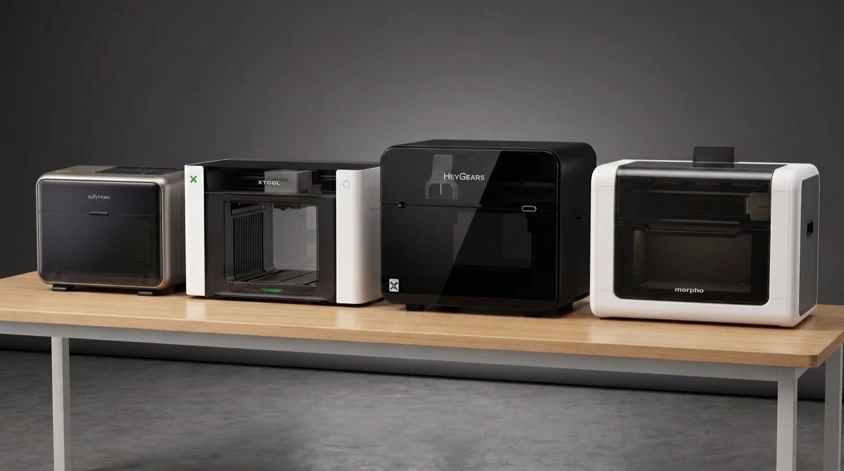
- Upcoming: HeyGears G1X and Morpho
- HeyGears G1X: UV Printing and Full-Color 3D
- Morpho: A More Open Desktop Platform
- Conventional Flatbeds and Dealer-Supported Options
- OMTech Spectra A3+
- Epson SureColor V1070
- Longer ePrint and Procolored
- Ink Cost Is Only the Starting Point
- A Shortlist for Different Workshops
- Frequently Asked Questions
The best desktop UV printer for a gift shop is not necessarily the best one for a garment business or a print shop running batches all day. Several of these machines share an A3-class bed, but their inks, object positioning, accessories and service arrangements lead to quite different workflows.
The xTool O1 Omni offers three configurations: Single UV at $2,499, Dual UV at $3,299 and UV + DT Fabric at $3,499. All use a 330 x 420 mm bed and full-bed scanning. Dual UV adds specialist white inks and fluorescent colors; the fabric edition adds a dedicated textile printhead.
The eufyMake E1 remains the more established choice. It is in stock and has a longer public record of reviews and owner reports. At $2,409 for the Basic bundle, it is also now slightly below the O1 Single UV's listed US price. For either machine, the relevant comparison is the complete setup needed for your products, not the standalone printer alone.
Other machines suit more specific requirements. The OMTech Spectra A3+ combines open ink tanks with a vacuum bed, while the smaller and substantially more expensive Epson V1070 comes with an established dealer and service network. HeyGears G1X and Morpho are the main upcoming alternatives, offering full-color 3D printing and a more open accessory system respectively.
The right choice depends on what will actually be printed. Rigid products, flexible materials, apparel, UV-DTF transfers and full-color 3D objects require different inks, accessories and finishing equipment. The machine should fit the intended product range without adding workflows that will rarely be used.
A desktop UV printer jets color, white ink and varnish onto an existing object and cures each pass with UV light. Repeated white or varnish layers can create a raised surface, but the process normally decorates a product rather than building one. Dedicated full-color 3D configurations, such as the HeyGears G1X package covered below, need additional materials and equipment.
This is a buying guide based on manufacturer specifications, support documentation, published prices and identified external reviews, not a side-by-side test of every machine. The shortlist weighs material compatibility, usable print area, positioning, finishing equipment, maintenance and access to service. Manufacturer speed and relief figures describe different jobs and settings; they are not comparative benchmarks.
The Best Desktop UV Printers Compared
| Machine | Workflow | US price or offer basis | Print area | Relief | Ordering status |
|---|---|---|---|---|---|
| eufyMake E1 | Direct-to-object printing with automated placement | $2,409 Basic / $3,209 Deluxe | 330 x 420 mm | Up to 5 mm | In stock; 1-3 business days |
| xTool O1 Omni | Choice of UV or UV + textile configurations | $2,499 / $3,299 / $3,499 standalone | 330 x 420 mm | Up to 7 mm | New orders: mid-November estimate |
| HeyGears G1X | Full-color 3D objects with additional equipment | $3,299 Starter / $3,599 Full-3D, Sep campaign offers | 420 x 330 mm | 5 mm in UV mode | Campaign ended; Dec 2026 original target |
| Morpho | Refillable cartridges and custom accessories | $2,699 Standard / $4,999 Pro MSRP; campaign discounts separate | 420 x 330 mm with A3 bed | 5 mm / up to 60 mm on Pro | Campaign runs to Oct 14; confirm reward schedule |
| OMTech Spectra A3+ | Open ink and batch production | $2,999.99 / $3,999.99 | 350 x 450 mm | Up to 5 mm | Official store says 1 business day |
| Epson SureColor V1070 | Dealer service and support | $9,299 | 212 x 299 mm | Texture effects | Epson direct out of stock; dealer sales |
| Longer ePrint | Open-ink UV and UV + textile configurations | $1,699 single UV / $2,499 dual UV | 310 x 420 mm | Up to 15 mm listed | Estimated shipping from October |
| Procolored V4-V11 Pro | Traditional compact Windows RIP flatbeds | $6,839 V11 Pro with jigs; other models vary | A5 to A3 | Varies | V11 Pro listed for ordering |
Store figures are advertised US prices before any applicable taxes, shipping or checkout discounts. HeyGears figures are historical September campaign rewards, not a current retail quote. Morpho MSRP is not its discounted campaign price. Dispatch estimates and crowdfunding targets are not delivery guarantees.
Matching the Printer to the Product
A material list is only the beginning. Printing onto glass, coated metal, acrylic and leather involves different surface preparation and durability requirements. xTool's material guidance, for example, calls for matching primers on glass, metal and acrylic, and a small-batch test on uncertain coatings. Its UV-printing guide also warns that a cured ink layer is not a dishwasher-resistant enamel finish. For mugs and drinkware, keep printed areas away from food and beverage contact surfaces.
For soft goods, distinguish flexible UV printing from textile printing. Flexible white ink can help a decoration bend with leather or a phone case; it does not turn ordinary UV ink into DTG ink. Apparel needs a compatible textile configuration and its own curing or transfer process. Likewise, UV-DTF decals for hard goods and heat-applied DTF garment transfers use different inks, films and finishing equipment.
Bed dimensions also say little about a mixed batch. A fixture takes up space, and the printable surface needs to sit at the height and orientation the machine supports. A tall object fitting under the head does not mean its entire curved or stepped surface can be printed sharply. For repeated phone cases, badges or laser-cut blanks, a repeatable jig can matter more than an extra few millimeters of maximum relief.
Before ordering, ask for a sample using your actual blank and artwork: fine text, a dark or transparent area needing white ink, and the varnish or texture you intend to sell. Request the complete job time, ink estimate and required surface preparation. Inspect the result after normal handling and cleaning appropriate to the product. That is a more useful buying check than comparing unrelated demonstration prints.
Printheads, Ink and Finishing Equipment
The printhead influences resolution, speed, ink configuration and the eventual cost of replacement. Epson's F1080 is the common entry-level option in this group. The larger i3200 used by the HeyGears G1X and Morpho Pro has more nozzles and is intended for higher throughput, while eufyMake and Epson handle replacement through their own service channels.
White ink is often the larger variable in running cost. It forms the base layer on dark or transparent products and supplies most of the material in raised textures. Two machines with similar CMYK consumption can therefore have very different costs once white layers, cleaning cycles and failed prints are included.
Maximum relief height can be misleading on its own. A 5 or 7 mm maximum is not the thickness of every texture; it is the upper limit produced by stacking many layers of ink. The taller the print, the longer it takes and the more white ink it consumes. Independent print times and measured ink use are more useful than the maximum height alone.
Some advertised workflows also require equipment outside the printer. Rotary printing needs an attachment, UV-DTF requires film and a laminator, and DTF or DTG apparel work requires a heat press. Those additions affect both cost and workspace requirements.
eufyMake E1: Direct Printing and Raised Texture
The E1 costs $2,409 as a Basic bundle with its initial ink set, or $3,209 as a Deluxe bundle with the rotary attachment and UV-DTF laminator. eufyMake's US store lists it as in stock with dispatch in one to three business days.
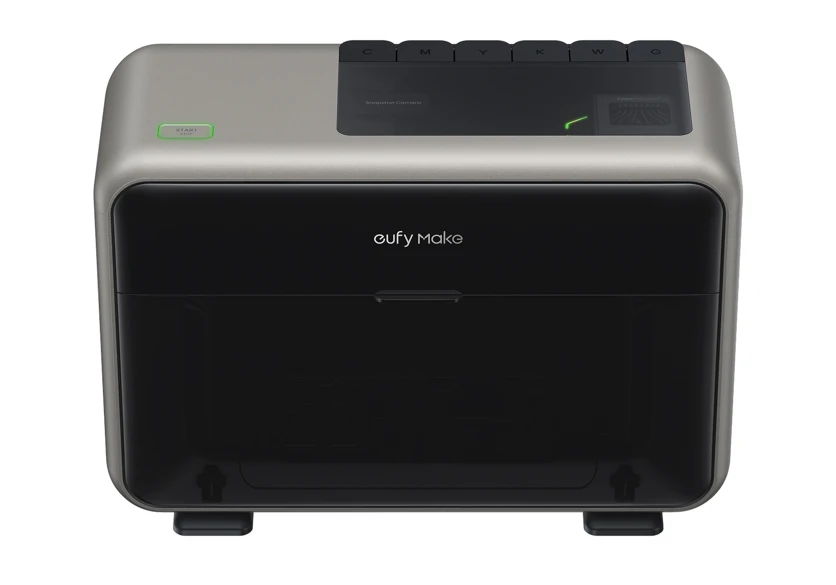
Its 330 x 420 mm bed is the same size as the O1's and the largest upcoming machines in this comparison. The E1 prints at up to 1440 dpi, accepts objects up to 100 mm tall and builds raised textures up to 5 mm. The camera and two lasers automate placement and height measurement, although automatic positioning is limited to objects up to 60 mm high. Users working near the edges of the larger bed should also account for the camera alignment variation covered in our E1 alignment guide.
Longer-term reviews and owner reports document the E1's print quality, maintenance behavior and ink use. UV inkjets still require regular care; automatic cleaning should not be mistaken for maintenance-free ownership.
A Faster Flatbed Mode Is Now Available
eufyMake added bidirectional printing in September through firmware 4.0.9 and eufyMake Studio 4.3.3. The head now deposits ink in both directions instead of returning without printing. According to eufyMake, this reduces print time by roughly 40 to 75 percent, depending on the mode and number of white layers.
The feature currently works only for flatbed jobs sent through the PC software. Rotary, roll-to-film and flexible-white workflows remain unidirectional. It is optional and requires recalibration after changes to direction, print bed or printhead.
The same update removed the previous hard stop on expired UV ink. The software now displays a warning and provides a 14-day observation period, while the cleaning cartridge remains subject to its expiry restriction. A new white-ink settling recovery routine and an intermediate cleaning mode were also added.
Ink and Maintenance Remain the Main Cost
E1 ink is proprietary. A 100 ml cartridge currently costs $29.99, equivalent to about $300 per liter, with subscriptions bringing the effective price to roughly $200 to $240 per liter. That is less than at launch, but still higher than the published ink prices for xTool, HeyGears, Morpho and OMTech. The full breakdown is in our E1 ink cost guide.
The printer automates white-ink circulation and routine cleaning, but those cycles consume ink and maintenance fluid. Tom's Hardware measured $7 to $10 in fluids and 6 to 12 ml of ink during a deep cleaning cycle. The replacement printhead costs $599; eufyMake covers the main machine for one year and the printhead for three months.
eufyMake has also demonstrated a larger continuous ink supply system, with 1-liter white and varnish tanks and 300 ml tanks for CMYK and maintenance fluids. It is intended for long, texture-heavy and batch jobs, but is not yet on sale and has no announced price. It therefore does not change the cost of an E1 available today.
xTool O1 Omni: Choose the Ink Configuration First
The O1 Omni offers three editions with different ink configurations. New US orders now carry a mid-November dispatch estimate, rather than the late-October date listed in our September update. The Single UV edition is $2,499. The OR1 rotary attachment is also estimated for mid-November, followed by the LM1 laminator and RF1 roll feeder in late November. A machine and its accessories may therefore arrive separately.
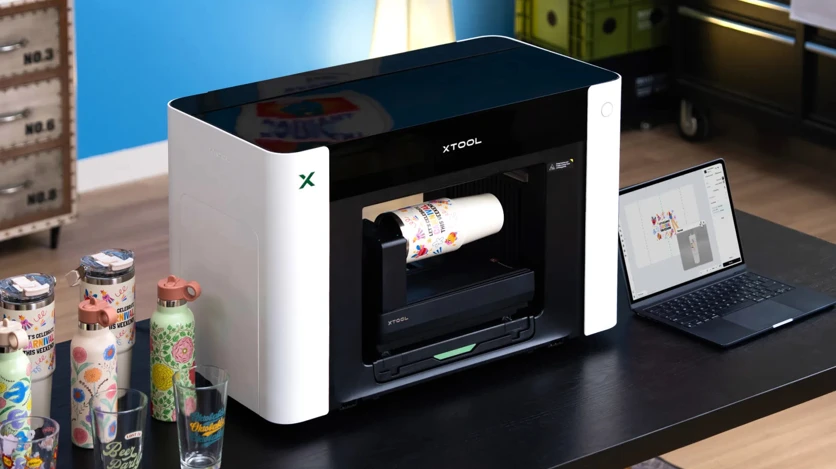
All three editions use the same 330 x 420 mm print bed, build relief up to 7 mm and use xTool's full-area Pixel-Scan system for placement. xTool quotes 720 x 1440 dpi output, a 1440 x 1200 dpi vision system and positioning accuracy within 0.2 mm. The machine also manages white-ink stirring, circulation and printhead moisture protection automatically.
Pixel-Scan combines laser measurement with a CIS scanner that moves across the bed instead of using a single overhead image. xTool says this maintains alignment from the center to the edges. The design directly addresses the edge variation reported on the E1, although production comparisons are still needed to establish how much difference it makes in practice.
The editions are not interchangeable:
- Single UV, $2,499: one Epson F1080 printhead with CMYK, white and varnish, intended primarily for rigid products.
- Dual UV, $3,299: two F1080 heads, adding separate rigid and flexible white inks plus fluorescent red and yellow. It targets flexible materials, fluorescent work and higher-volume UV printing.
- UV + DT Fabric, $3,499: one F1080 head for UV work and a second for fabric ink. It supports direct-to-garment and DTF workflows as well as direct UV printing, but gives up the Dual UV edition's fluorescent and specialist white channels.
Every edition requires the separate LM1 laminator for UV-DTF transfers. The fabric model also needs the usual DTF finishing equipment—adhesive powder and a heat press—or pressing before and after direct garment printing. The "four-in-one" description refers to its supported workflows, not processes completed entirely inside the printer.
Standard O1 UV ink is now listed at $16.99 per 125 ml bottle, or about $136 per liter. Dual UV specialist inks use different prices and capacities: rigid and flexible white cost $29.99 per 290 ml bottle, while fluorescent red and yellow cost $24.99 per 125 ml bottle. Because the machine uses xTool supplies, its longer-term operating cost will depend on post-launch ink pricing and the amount consumed by routine cleaning.
The O1 does not yet have the E1's depth of ownership data. Buyers should check the delivery estimate for their specific configuration and accessories alongside reports on maintenance and support.
Upcoming: HeyGears G1X and Morpho
Both Kickstarter projects offer industrial Epson i3200 printhead options and workflows not available on the E1 or O1. The G1X adds full-color 3D printing, while Morpho pairs its Pro configuration with refillable cartridges and an open system for custom jigs and accessories.
HeyGears G1X: UV Printing and Full-Color 3D
HeyGears' campaign ended on September 11 with 4,020 backers and $17.88 million pledged. December 2026 was the original G1X delivery target; buyers considering a later order should confirm the applicable schedule and package rather than relying on the closed campaign's offer.
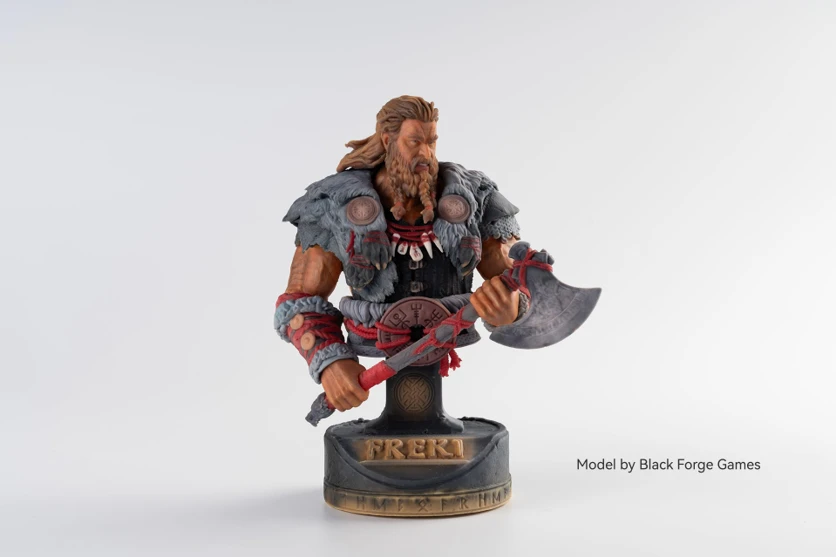
The G1X Starter, offered at $3,299 during our September campaign check, uses an industrial Epson i3200 printhead with eight channels, a 420 x 330 mm flat bed, 1440 x 2400 dpi listed resolution and relief up to 5 mm. The campaign's $3,599 Full-3D package adds the Resin Station and material kit needed to build freestanding, full-color objects rather than decorating an existing surface. Its open-bed build volume reaches 330 x 420 x 130 mm; the enclosed configuration reaches 130 x 330 x 150 mm.
That full-color 3D process is the reason to consider the G1X over the E1 or O1. It combines colored and transparent resin with water-soluble support and is intended to produce finished color without painting, according to HeyGears. The process uses more materials than conventional UV printing: the company's example for a 197.8 x 110.8 x 77 mm model consumes nearly a liter of resin, including its water-soluble support material.
HeyGears gives the printhead six months of campaign warranty coverage and the main unit one year. Third-party ink is not blocked in hardware or software, but the company ties its print profiles and warranty support to official materials. The lower-cost G1 uses an F1080 head; our September campaign check listed it at $1,999 with a March 2027 target, so it was not a near-term alternative to the shipping UV machines.
Read our HeyGears G1 Series guide for the complete package and full-color 3D workflow.
Morpho: A More Open Desktop Platform
Morpho's campaign runs until October 14. The official product page lists MSRP of $2,699 for the F1080-based Standard and $4,999 for the i3200 Pro; discounted campaign rewards are separate. The December 2026 to January 2027 factory shipping window cited in our September coverage was a campaign target, not an in-stock delivery promise.
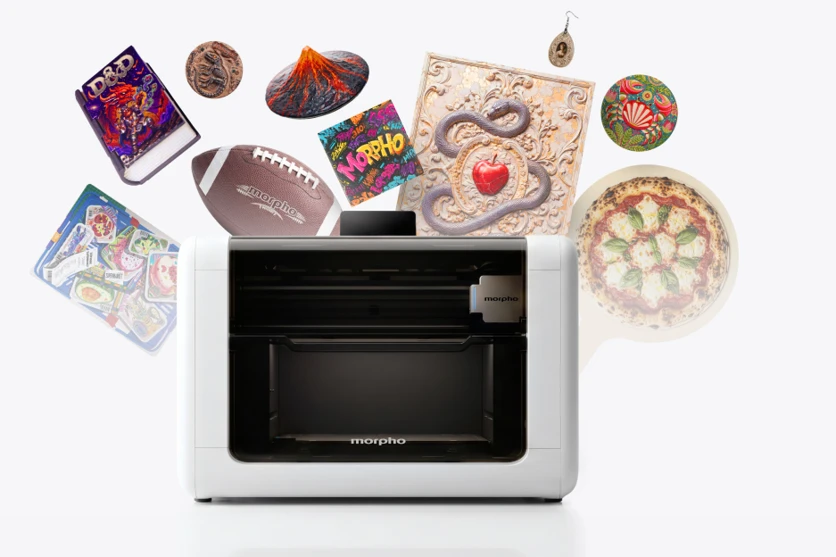
Both versions use a moving gantry over a stationary object, four cameras, infrared surface measurement and a built-in spectrophotometer. The enclosed area is 330 x 220 mm; an included A3 bed extends it to 420 x 330 mm. Morpho quotes 0.2 mm placement accuracy and supports refillable cartridges.
The Standard machine supports relief up to 5 mm, while the Pro extends that height to 60 mm.
Morpho's clearest difference is its open accessory approach. Its Open Jig System, electrical connections and software SDK are intended for custom fixtures and accessories, while refillable cartridges reduce dependence on a single consumable format. The optional rotary, electrostatic mat and roll-to-roll module cover cylinders, thin media and UV-DTF transfers. Published campaign ink works out to about $108 per liter for CMYK and $83 per liter for white or varnish.
Our Morpho UV Printer article covers the printheads, software, low-odor ink claims, maintenance system and accessories in detail.
Conventional Flatbeds and Dealer-Supported Options
The E1 and O1 are the closest match for buyers who want an enclosed, consumer-style workflow. Several more conventional flatbeds remain relevant for businesses that prioritize open ink, dealer service or established RIP software.
OMTech Spectra A3+
OMTech currently lists the Spectra A3+ at $2,999.99 with one Epson F1080 head or $3,999.99 with two, and says orders ship in one business day. It has a 350 x 450 mm vacuum bed, 140 mm media clearance, infrared height sensing and up to 5 mm relief. The dual-head version separates CMYK and white from varnish and provides separate ink channels for those layers. That configuration may suit repeated white-and-varnish jobs, but the number of heads alone does not establish finished-job throughput.
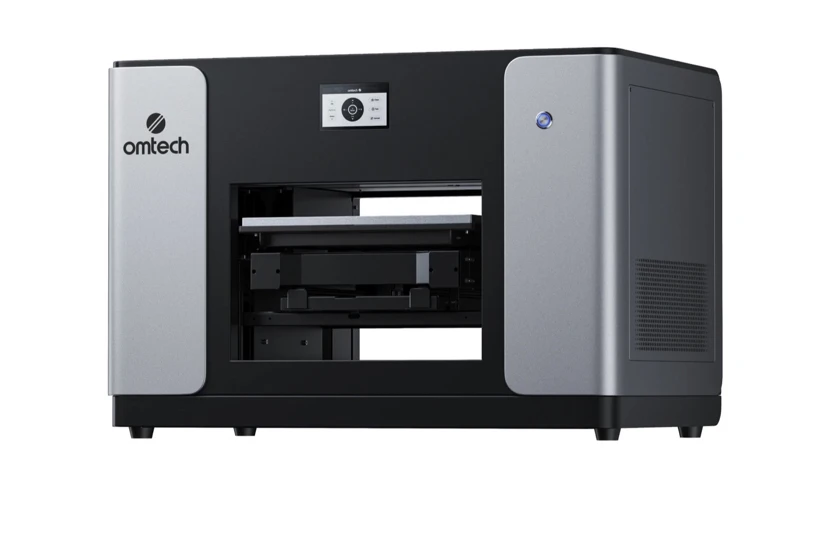
Its open 250 ml ink tanks are the main advantage. OMTech sells six 500 ml bottles for $199.99, about $67 per liter, and does not use proprietary cartridges. It uses OMTech Print software and a vacuum table, rather than the camera-led placement workflow of the E1. Compare its fixture setup and maintenance routine with the actual batch work you intend to run. OMTech covers the main machine for one year but the printhead for one month.
Epson SureColor V1070
Epson's $9,299 SureColor V1070 has a smaller A4-class 212 x 299 mm bed and uses proprietary 140 ml UltraChrome UV packs. Its direct online listing was out of stock when checked, although the machine is also sold through Epson dealers.
The smaller bed makes the V1070 a different proposition from the A3-class machines. Its dealer network, proprietary printhead and Edge Print PRO workflow may suit a shop that wants a supplier-supported installation. Ask the local dealer which maintenance tasks remain with the operator and what a service visit or replacement head costs; a brand name alone does not establish the support included in a particular quote.
Longer ePrint and Procolored
Longer now lists the single-head ePrint SE from $1,699 and the dual-head ePrint at $2,499, with shipping now estimated from October. Its current specification includes an open ink system, a 310 x 420 mm bed, 12 channels on the dual-head model, up to 15 mm of color relief and UV, UV-DTF, DTF and DTG workflows.
Longer has expanded the ePrint specification since launch, but its original Kickstarter shipping target was June 2026 and the current store still lists new orders with an estimated shipping date. Confirm the edition, supplied ink and accessory schedule before budgeting a UV or apparel setup; the capabilities of the complete range should not be assumed for the entry-level package.
Procolored continues to sell compact UV flatbeds from the A5 V4 to the dual-head A3 V11 Pro. The V11 Pro package with jigs is now listed at $6,839. These are more traditional Windows RIP machines with bottled ink and legacy Epson-derived printheads. The range is available now, but buyers should evaluate support and software carefully: Procolored's official download server distributed malware-tainted printer software during 2025 before the files were replaced. That history remains relevant when the printer requires vendor software on a production PC.
Generic XP600 flatbeds can cost less and may suit an experienced technician, but low purchase price can be offset quickly by setup work, uncertain software, replacement parts and limited local support. They are not equivalent to an enclosed appliance simply because the bed and resolution figures look similar.
Ink Cost Is Only the Starting Point
| Machine | Ink system | Published price per liter |
|---|---|---|
| eufyMake E1 | Proprietary 100 ml cartridges | About $300; $200-240 with subscription |
| xTool O1 Omni | Proprietary 125 ml standard bottles | About $136; specialist inks priced separately |
| HeyGears G1/G1X | 300 ml official UV bottles | About $77-117 at campaign prices |
| Morpho | Official or refillable cartridges | About $108 CMYK; $83 white/varnish |
| OMTech Spectra A3+ | Open bottled-ink system | About $67 for OMTech's 3-liter set |
| Epson V1070 | Proprietary 140 ml packs | About $550 |
Bottle price is not the same as cost per finished item. White layers, relief height, cleaning cycles, failed prints and maintenance behavior can outweigh the headline per-liter figure. Introductory and crowdfunding consumable prices can also change.
Published bottle prices omit the ink lost to startup, idle maintenance and cleaning. White consumption also rises sharply on dark substrates and relief work. For newly shipped or crowdfunded machines, those costs will remain difficult to judge until owners have accumulated longer-term data.
The printhead should be treated as a wear item even when a manufacturer gives it a longer expected life. Warranty periods vary sharply: three months on the E1 head, six months for the HeyGears campaign, and one month on the OMTech Spectra, while the chassis generally receives one year. Replacement price, availability and the procedure for fitting a head belong in the cost model.
Built-in carbon and HEPA filters do not replace the manufacturer's ventilation guidance. Ink, pretreatment and maintenance fluids need an appropriate workspace, while filters, waste containers and cleaning supplies should be included in operating costs.
A Shortlist for Different Workshops
- Choose the xTool O1 Single UV if the work is mainly rigid products and 7 mm relief, lower published ink prices than the E1 and full-bed scanning matter. Allow for the current mid-November estimate on new US orders and check when the required accessories will ship.
- Choose the xTool O1 Dual UV for separate white inks for rigid and flexible materials, fluorescent colors or higher UV throughput. It is the relevant O1 configuration for those specific ink requirements. Choose UV + DT Fabric instead if garments matter more than those specialist UV inks. Buy the configuration you need rather than assuming a second head or a different ink system can be added later.
- Buy the eufyMake E1 if the machine is needed immediately and a longer record of owner experience matters more than the O1's additional features. Its $3,209 Deluxe bundle includes the rotary attachment and UV-DTF laminator, making it worth comparing with a complete O1 accessory bundle rather than the O1 standalone price.
- Consider the HeyGears G1X Full-3D only if printing complete full-color 3D objects is central to the plan. That capability, rather than ordinary flat-bed UV work, is what separates it from the E1 and O1.
- Consider Morpho for its i3200 option, refillable cartridges, open accessory system and relief up to 60 mm on the Pro model.
- Compare OMTech and Epson with a local supplier if open ink, a vacuum bed or dealer service takes priority. Ask who replaces a failed head, where the parts are stocked and what support is included in the purchase price.
For conventional product decoration, E1 and O1 are the first two machines to compare. The E1 has the longer ownership record and a readily priced rotary and laminator bundle. The O1 offers more ink configurations and full-area scanning, but its standalone price has risen since launch and new orders have a later dispatch estimate. Neither advantage settles which machine will produce your particular items more reliably: a suitable sample, complete accessory quote and clear service arrangement should decide the purchase.
Frequently Asked Questions
What is the best desktop UV printer in 2026?
For direct-to-object printing, start by comparing the eufyMake E1 and xTool O1 Omni against your materials and required accessories. E1 has a longer public ownership record; O1 offers different UV and textile ink configurations. OMTech suits an open-ink flatbed workflow, Epson offers dealer support, and HeyGears G1X targets full-color 3D objects. This guide is a specification and workflow comparison, not a side-by-side test establishing one machine as the best at every job.
Is the xTool O1 Omni available now?
The O1 is available to order, but a new order is not the same as an immediately available unit. On October 8, xTool's US store listed standalone editions from $2,499 with estimated dispatch from mid-November. The OR1 rotary attachment also carries a mid-November estimate; the LM1 laminator and RF1 roll feeder are estimated from late November.
Which xTool O1 Omni edition should I choose?
Single UV is the $2,499 entry model for rigid products. Dual UV costs $3,299 and adds a second UV printhead, flexible and rigid white inks and fluorescent red and yellow. The $3,499 UV + DT Fabric edition replaces those specialist UV channels with a dedicated textile head for DTG and DTF. Choose the edition for the materials you intend to print; do not assume that another head or different ink configuration can be added later.
How much does the eufyMake E1 cost?
The official US price is $2,409 for the Basic bundle with ink and $3,209 for the Deluxe bundle with ink, rotary and UV-DTF laminator. Temporary discounts can reduce those prices. The E1 is listed as in stock with shipping in one to three business days.
Which desktop UV printer has the cheapest ink?
OMTech's published six-bottle, 3-liter set works out to about $67 per liter. The O1's standard ink now costs about $136 per liter, while E1's published single-cartridge price is about $300 before subscriptions. Historical campaign prices and specialist inks are listed separately in the table. These figures do not establish the cheapest finished print: white layers, maintenance cycles and rejected work also consume ink.
Can a desktop UV printer print on T-shirts?
A standard UV configuration is not a substitute for a garment printer. The xTool O1 Omni UV + DT Fabric edition has a dedicated textile head for DTG and DTF. DTF needs adhesive powder and a heat press; DTG has its own preparation and curing steps. Longer lists textile workflows on its UV + DT configuration, with shipping currently estimated from October. Flexible UV white ink for leather or other bendable objects is a different application.
Can these UV printers make full-color 3D objects?
Most desktop UV configurations decorate an existing object and build raised ink on its surface. The HeyGears G1X Full-3D package adds equipment and materials for freestanding full-color objects; December 2026 was its campaign delivery target. Morpho also lists specialty-ink full-color 3D support for the Pro, but that is separate from its ordinary UV workflow and should be checked as a specific package rather than assumed from the relief height.
Should I wait for HeyGears G1X or Morpho?
They are worth waiting for only if their specialist features justify the crowdfunding and schedule risk. G1X is the stronger choice for full-color 3D objects and uses an i3200 printhead. Morpho combines an i3200 Pro model with refillable cartridges and an open jig and accessory system. For conventional desktop UV product printing, E1 and O1 remain the more direct choices.
Do desktop UV printers need ventilation?
Yes. Enclosures and HEPA or activated-carbon filters reduce particles and odor but do not eliminate the need for a ventilated workspace. Ink, pretreatment and cleaning fluids should be handled according to their safety documents, and replacement filters and waste containers should be treated as operating costs.
What matters most when comparing UV printer specifications?
Start with the printhead, ink configuration, print area, object clearance and the exact workflows included. Then compare ink price, cleaning behavior, printhead warranty, replacement parts, software and delivery status. Relief height and headline resolution matter less if the machine cannot support the materials, throughput or service requirements of the intended work.
How should I compare samples before buying?
Use the same artwork and actual blank on each shortlisted machine. Ask for the white-layer settings, varnish or relief, surface preparation, complete job time and estimated ink use. Check alignment and fine text, then assess the print after the handling and cleaning expected for that product. Different demonstration designs or maximum dpi figures do not provide a like-for-like comparison.
Sources
- eufyMake E1 official product page, for bundle pricing, stock status, specifications and warranty (checked Oct 8, 2026)
- xTool O1 Omni official store, for edition prices and estimated dispatch of new machine and accessory orders (checked Oct 8, 2026)
- HeyGears G1X product page, for printhead, print area, full-color 3D workflow and campaign ink prices (checked Sep 9, 2026)
Share this article


Related articles
UV Printers · Jun 29, 2026
xTool O1 Omni Printer: Prices, Editions, and Ink Costs
xTool says 'from $1,699' for a 4-in-1 that prints on wood, tumblers, and T-shirts. That number is a deposit-locked early bird on the single-head model, and the only edition that does all four jobs is $2,799. Here's every price, the published ink costs, and what it can't do.
19 min read
3D Printers · Jun 12, 2026
HeyGears G1 and G1X: Full-Color 3D Printing Gets a Desktop Price
Full-color 3D printing used to mean a $50,000 machine. HeyGears put it on a desk for $3,299. The three tiers print very different things, and HeyGears has now published the ink, resin and printhead numbers that decide the real cost of ownership. Here's every price, what each pack buys, and what it costs to run.
18 min read
UV Printers · Jul 2, 2026
Morpho UV Printer Kickstarter Passes $10 Million
More than 2,800 people have backed the campaign, which runs until October 14. Morpho has also detailed the two printheads, open jig and ink system, accessories and expected shipping.
10 min read