SolidCraft: an open-source Fusion alternative for 3D printing
David Chacón9 min readThis article is also available in:
A familiar modeling workflow, files you manage yourself and no required subscription. SolidCraft has an appealing proposition for makers, even while its CAD tools are still taking shape.
Contents
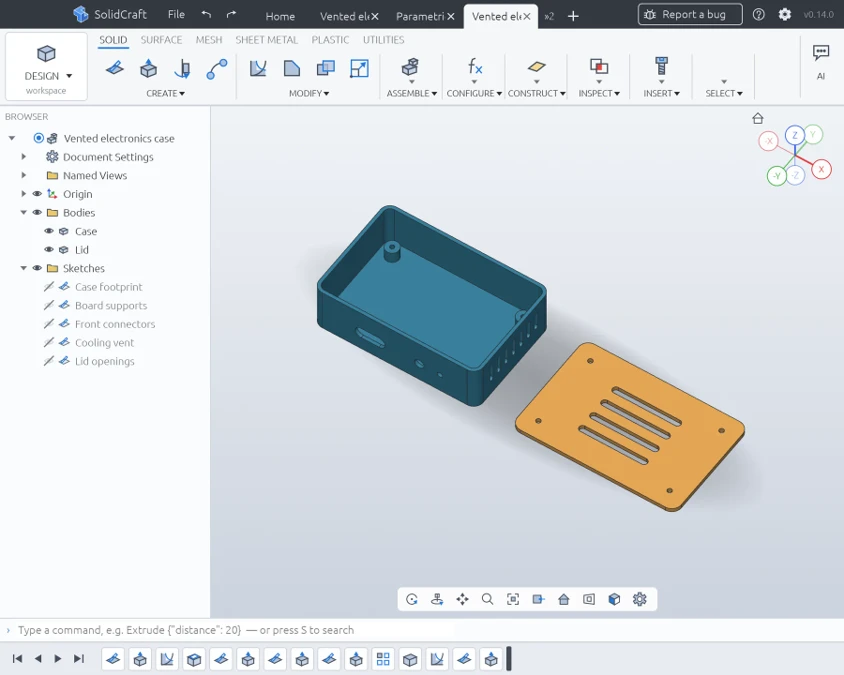
A vented electronics case and its lid in SolidCraft. Images throughout this article are from our hands-on session.
Autodesk Fusion is hard to leave for a good reason: its modeling workflow makes sense. Draw a sketch, give it dimensions, turn it into a solid and add the details. If something needs to change, go back to an earlier step and let the rest of the model follow. For designing brackets, enclosures and replacement parts, it is a useful way to work.
The decision gets more complicated when you look beyond the modeling tools. A subscription is a recurring expense. Cloud-based project storage may not suit the way you organize your work. And if you want to move your computer to Linux, the desktop applications you depend on can become a reason to stay where you are.
SolidCraft is a new open-source CAD application that addresses several of those concerns. It runs on Windows, macOS and Linux, saves editable designs locally and follows a parametric workflow that Fusion users should recognize. It also runs in a browser and can work with AI assistants, although you do not need one to use it.
It is still an early project. Even so, there is already enough here to make it interesting for people who primarily use CAD to design things they intend to 3D print.
A familiar way to design
Open SolidCraft and the layout is immediately recognizable. Modeling tools sit across the top, bodies and sketches appear in a browser on the left, and the feature timeline runs along the bottom. The arrangement gives Fusion users familiar places to look as they find their way around.
The basic sequence is familiar too. Start a sketch on a plane or a flat face, draw a profile and add dimensions or constraints. Extrude it into a solid, cut away material, round an edge or hollow out a body. Those operations remain in the timeline, ready to be edited later.
For 3D printing, that ability to return to an earlier decision is often more useful than a long list of advanced tools. A mounting plate may need to get wider without changing its screw holes. An enclosure may need more room for a connector while keeping the same wall thickness. A model that remembers those relationships is much easier to adapt than a finished mesh.
SolidCraft's parameters let you give dimensions names and use them in expressions. A hole can sit a fixed distance from an edge, for example, rather than at a coordinate that only happens to be correct for the current size of the part. Change the overall width and the hole follows the edge.
Making our vented enclosure taller kept its walls, mounting posts and openings in place. The change carried through the existing features without having to rebuild the design from scratch.
The appeal is easy to understand. Once you have a useful design, you can adapt it for another project instead of starting over. For a workshop making fixtures, electronics cases or small batches of customized parts, that is a large part of what CAD needs to do well.
Your files, your choice of computer
One of SolidCraft's strongest attractions has little to do with drawing.
You can save a design as a .solidcraft file in a folder of your choice,
then open it again with its sketches, parameters and feature history intact.
We were able to get started without creating an account.
That gives the application a straightforward place in an existing workshop. Designs can sit alongside customer notes, reference images and slicer projects. They can be copied to another drive, included in your backups or synchronized through whichever service you already use.
Fusion organizes its normal design workflow around cloud storage and also offers local archive exports. SolidCraft's working document is already a local file. For people who prefer managing their own project folders, that is a meaningful difference in everyday use.
Linux support adds another reason to pay attention. SolidCraft offers a native desktop application for Linux as well as Windows and macOS. It gives makers another CAD option when choosing an operating system, without requiring them to make the browser their main workspace.
Of course, open-source CAD on Linux already exists. FreeCAD is an established option, with its own approach to parametric modeling. SolidCraft offers another way into that kind of work, with an interface that may feel more familiar to someone coming from Fusion. How comfortable either application becomes will depend on the person using it and the parts they design.
SolidCraft is available under a choice of the MIT or Apache 2.0 license, with the code published in its GitHub repository. There is no required CAD subscription. Fusion's free personal-use edition, by comparison, is a limited offering for qualifying non-commercial work. For makers who also sell their designs or printed parts, that distinction deserves attention when choosing their software.
From a model to the slicer
A CAD application also needs to fit into the tools that come after it. SolidCraft exports STEP for exchanging solid geometry and supports mesh formats including 3MF and STL for print preparation.
Our motor mount exported as a 3MF, opened in Bambu Studio at the intended size and sliced successfully. That is the practical connection most 3D-printing users will want: design a part, export it and continue preparing the job in the slicer they already know.
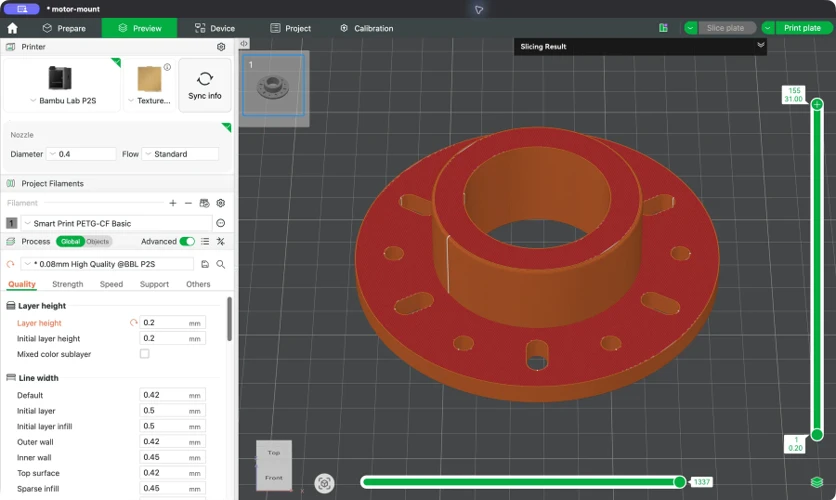
The same motor mount in Bambu Studio's layer preview. It sliced successfully; we have not physically printed this part.
You still choose the printer, material and process settings in the slicer. A CAD export carries the model into that workflow; it does not automatically supply a finished print project.
It is also worth keeping the editable .solidcraft design alongside any
exports. STEP is useful for moving solid geometry between CAD applications,
but it does not carry the original sketch-and-feature history with it.
STL and 3MF are mesh files, so they are further removed from the dimensions
and relationships that made the design easy to change.
That matters if you are thinking about moving existing work from Fusion.
SolidCraft does not currently list native Fusion .f3d files among its
supported imports. Exporting a STEP file gives you a route to the geometry,
but you should not expect the original timeline to appear in the new editor.
The newer FreeCAD and Rhino import options likewise bring in solids rather
than recreating the original design history.
For a new project, this is simpler: keep the native file as the editable master and export the version you need for the next application.
AI is optional, but it opens up another way to work
SolidCraft also has an automation interface built around MCP, the Model Context Protocol. A compatible AI assistant can create geometry, inspect a part, change parameters and export files. It can work in the background or connect to the desktop application so you can see the model taking shape.
The interesting part is what remains afterward. The result can be a design with ordinary sketches and features that you can open and revise in the editor. That gives automation a useful role in CAD: it can help construct a part without taking away the ability to understand or change it.
The parts pictured in this article were created through SolidCraft's command interface and adjusted in its desktop editor. Being able to move between those two ways of working is one of the project's more promising qualities.
There are practical possibilities here for generating related sizes of a spacer, adapting an enclosure or making variations of a fixture. You still need to describe the part correctly and inspect the result, especially where fit and clearance matter. But repetitive modeling work is a reasonable place to explore assistance.
You can also ignore the AI features and use the CAD editor on its own. Connecting an assistant is a separate choice, and any cost or cloud connection for that assistant depends on the service you choose.
Still a young CAD application
The familiar interface makes it tempting to expect everything that Fusion can do. SolidCraft has a narrower focus, and its maturity matters as much as its feature list.
Fusion brings together mechanical design, machining, simulation and electronics. SolidCraft's main appeal today is its CAD workflow. It has tools for assemblies, configurations, sheet metal and plastic parts, but manufacturing/CAM, simulation and full engineering drawings remain deferred. If those are central to your work, they are substantial gaps.
For someone using Fusion mainly to design printable parts, the comparison is more encouraging. The sketch, solid and timeline workflow is already there, and our simple designs survived changes to their dimensions. That makes SolidCraft useful enough to explore without assuming it can take over every project in a workshop.
There are also rough edges beneath the interface. The developers acknowledge slow fillets, Boolean operations and STEP imports. A new geometry kernel called SolidCore is in development, but it is future work rather than a solution already delivered in the version we used.
These are operations that can make a considerable difference once a model gets more complicated. A small enclosure working well does not tell you how a large assembly or a difficult imported part will behave. Trying a familiar part of your own is a useful way to find out whether the application fits your needs.
The pace of development brings another question: how well will the project be maintained over time? New tools draw attention, but dependable CAD also needs bug fixes, clear documentation and care for existing files. Open-source licensing makes it possible for others to inspect the code, contribute or continue the work. A reliable application still depends on people doing those things consistently.
A promising option for makers
SolidCraft makes a compelling first impression because it brings together things many makers want: recognizable CAD tools, locally saved projects, native Linux support and the freedom to use and modify the software. The optional automation features add an interesting direction of their own.
It is too early to call it a complete Fusion replacement. It is already interesting as an alternative for someone whose work centers on designing small, functional parts for 3D printing. The basic workflow is usable, the designs remain editable, and there is a practical route into a slicer.
For an established workshop, that makes it a project to try alongside the software already doing the job. For someone looking for a way into parametric design, it is another open-source option to explore. Its longer-term place will depend on how well it develops from a promising young application into a tool people can rely on every day.
SolidCraft is available from its website and GitHub releases.
Share this article



Related articles

Pricing · Jun 10, 2026
How to Price 3D Prints: The Complete Guide (2026)
The most repeated pricing rule in this hobby quotes below cost. Here's the formula that doesn't: margin math, the fee gross-up, and one part priced three ways to a final number.
9 min read
Software · Oct 8, 2026
HeyGears Partners With Tripo on AI Models for Full-Color 3D Printing
The collaboration aims to make it easier for creators to turn images and ideas into textured 3D models for HeyGears' desktop printing system.
3 min read