xTool C1 Brings Color Printing to the Craft Cutter
David Chacón6 min readThis article is also available in:
The xTool C1 prints and cuts stickers, cards and clothing transfers in one machine, with a scanner to help place artwork on the material.
Contents
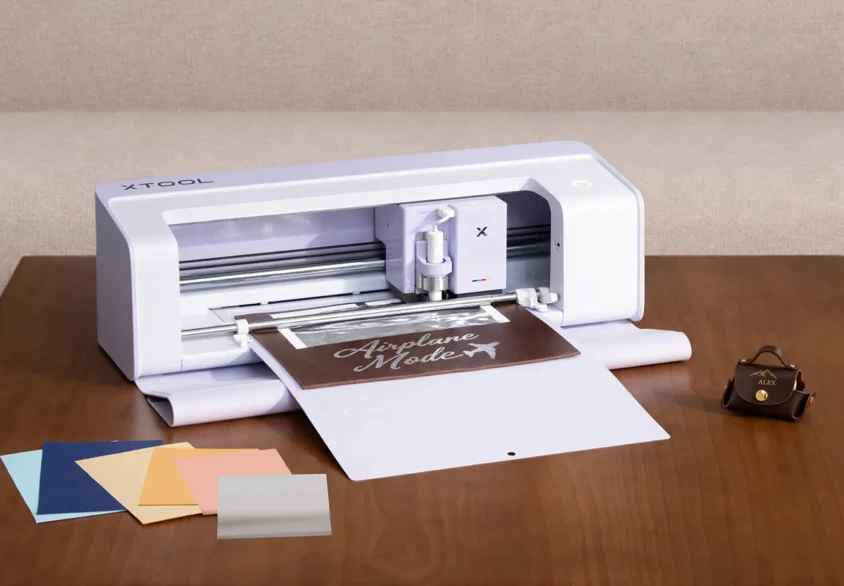
The C1 with xTool's optional foil-transfer tool. Image: xTool.
xTool's new C1 Color Cutter brings a printer and scanner into a desktop cutting machine, so making a sheet of stickers doesn't have to mean switching between two devices.
The Basic package is listed at $469 in the US and €519 in Europe as of October 20, 2026. Reservations are open through xTool's store, with final payment starting in November.
In a typical print-then-cut setup, a sheet comes out of an inkjet printer and goes into a cutter. The cutter reads printed guide marks to find the artwork before cutting around it. For a few labels, that's a manageable routine. Repeat it across a batch of orders and the extra handling starts to matter.
The C1 puts printing and cutting in the same place. That's the appeal for someone making stickers, cards or small batches of personalized products: fewer things to line up between the design and the finished piece.
Print the colors, then cut the shape
An illustration with several colors can mean cutting separate pieces of vinyl and lining up the layers by hand. Printing gives another route: put the whole image on a suitable sheet, then cut its outline.
That's how the C1 approaches color work. Its inkjet cartridge prints the artwork, and the blade handles the shape. A gradient in a logo or the shading in a pet portrait can stay in the image, without having to turn every color into another piece of vinyl.
xTool says the built-in print-and-cut process works without registration marks, leaving more of the sheet available for artwork. The machine can also cut designs printed on a separate printer, so existing printed artwork still has a place in the process.
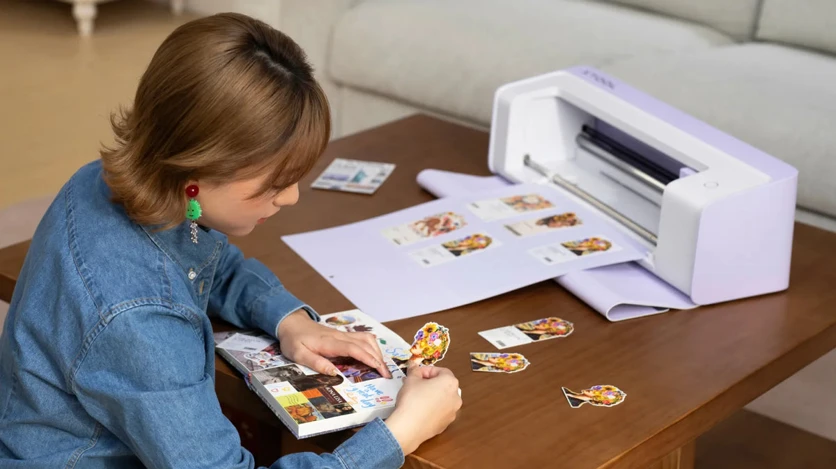
Printed illustrations can be cut into individual shapes for journals, cards and other paper projects. Image: xTool.
See where the design will go
xTool says the scanner shows the loaded material on screen, allowing designs to be positioned over that view before cutting. A leftover piece of vinyl could have room for another small label. Patterned paper might have a detail worth placing inside a particular shape.
The contour tool is designed to find the outline of a drawing or printed illustration, saving the step of tracing it in design software. A hand-drawn character could become a card decoration or a cutout for a journal.
The choice of mat matters here. Compatible third-party mats work for printing and cutting, but scanning requires official xTool mats, the company says.
xTool lists the following specifications:
| Specification | xTool C1 |
|---|---|
| Printing | Thermal inkjet, four-color CMYK pigment cartridge |
| Maximum print resolution | 720 × 1,200 dpi |
| Scanner resolution | 300 or 600 dpi |
| Standard mat working area | 12 × 12 inches, about 305 × 305 mm |
| Long mat working area | 12 × 24 inches, about 305 × 610 mm |
| Maximum cutting speed | 509 mm/s |
| Material thickness | Up to 3 mm, depending on the material and tool |
| Connection | USB or Wi-Fi |
Different projects need different tools
The fine-point blade supplied with the C1 is intended for paper and vinyl. For other projects, the tool changes: a deep-point blade handles thicker card and leather, while a rotary blade is intended for fabric. xTool rates its additional cutting blade for balsa wood and leather up to 3 mm thick.
That range opens up more than sticker making. Pens can draw lettering, and foil-transfer tips add metallic details to cards and other crafts. An optional electrostatic mat holds delicate sheets without adhesive, while a roll holder helps feed longer material through the machine.
The Basic package includes the machine, ink cartridge, fine-point blade, cutting mat and starter materials. The other tools are optional, so the setup for paper labels won't necessarily be the same as the one for fabric or foil.
The material is part of the job
Beyond sticker paper, xTool lists cardstock, photo paper, shrink film, wood and fabric among its printable materials.
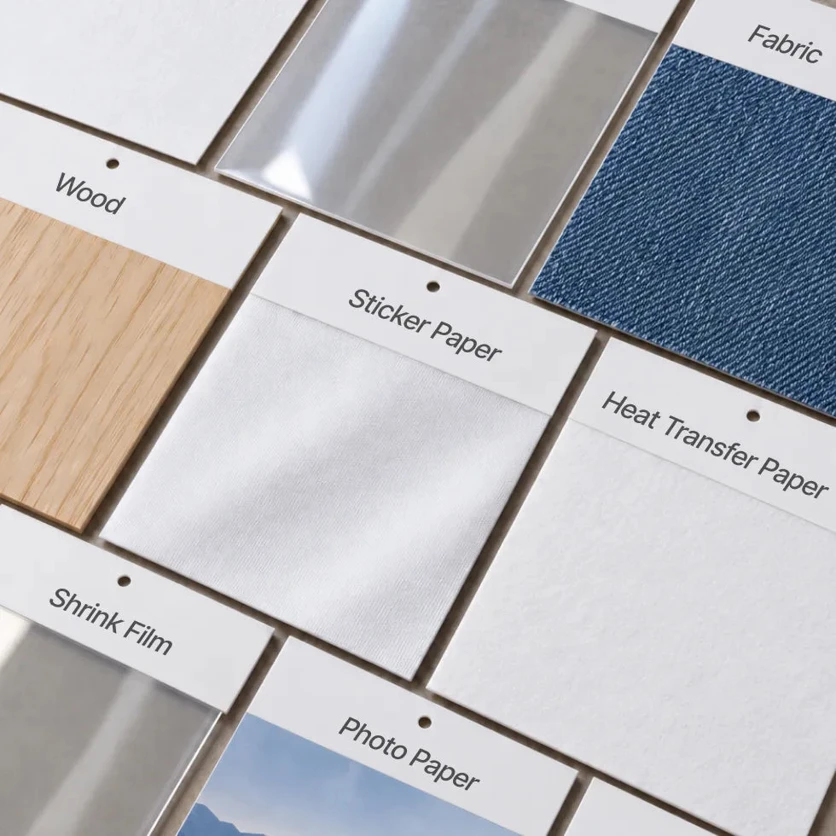
Wood, fabric, sticker paper and transfer paper are among xTool's material examples. Image: xTool.
For a T-shirt, one route is to print and cut compatible heat-transfer paper, then use a separate heat press to apply the design. xTool also lists direct fabric printing, which requires pretreated fabric.
Wood and acrylic may need primer spray for better printing results. A printable surface isn't automatically suitable for blade cutting, so the material and tool still have to match the job.
The company claims its proprietary ink produces waterproof stickers without lamination and apparel prints that last up to 30 washes.

xTool's examples include clothing transfers, stickers, jar labels and cards. Image: xTool.
What's included, and when it's coming
For now, ordering starts with a reservation. The deposit is $10 in the US or €10 in Europe, credited toward the machine and refundable before final payment. It also comes with extra materials and a discount on a later material purchase.
Final payment opens on November 5 at 6 p.m. Pacific Standard Time, which is November 6 at 3 a.m. Central European Time. The US store estimates that orders will start shipping in early to mid-November; delivery timing varies by region.
The Atomm Membership package contains the same machine, with an initial month of xTool's Atomm Pro design subscription added. Its price is due to be revealed on October 31.
Where the C1 could fit
A scanner inside a craft cutter isn't a new idea. Brother's ScanNCut range already combines those jobs. The C1 adds color printing to that combination, which gives it a particular appeal for sticker sheets, labels and cards.
For readers who know xTool through its O1 Omni Printer and X1 laser platform, the C1 is aimed at a different set of everyday projects. It cuts with a blade and puts color on craft materials, with paper and vinyl at the center of the offer.
If making those products regularly means moving sheets between a printer and a cutter, bringing the two together could simplify the routine. There will still be ink, blades and mats to replace. For a shop working through repeat orders, how long a cartridge lasts and what it costs to replace will matter well beyond the initial purchase.
Is the xTool C1 a laser cutter?
No. It cuts with a blade and prints with an inkjet cartridge. Its tool options cover paper crafts, vinyl, fabric and selected thicker materials.
Can the xTool C1 make T-shirt designs?
Yes. Its apparel workflow uses compatible printable transfer paper and a separate heat press. Direct printing requires pretreated fabric.
Does the Atomm package include a different machine?
No. xTool says both packages contain the same C1 hardware. The membership package adds an initial month of Atomm Pro.
Share this article



Related articles
UV Printers · Jun 29, 2026
xTool O1 Omni Printer: Prices, Editions, and Ink Costs
xTool says 'from $1,699' for a 4-in-1 that prints on wood, tumblers, and T-shirts. That number is a deposit-locked early bird on the single-head model, and the only edition that does all four jobs is $2,799. Here's every price, the published ink costs, and what it can't do.
19 min read
Lasers · Aug 31, 2026
xTool Unveils X1 Hybrid Laser Platform With Swappable Laser Modules
xTool's modular laser platform combines CO2 cutting with a moving galvo head for detailed engraving. New technical documentation explains how its fiber, MOPA and UV options connect.
7 min read

CNC Machines · Aug 30, 2026
InfiMaker Launches K1 Desktop Five-Axis CNC on Kickstarter
Kickstarter pledges start at $5,199 for the enclosed CNC mill, with InfiMaker estimating delivery for December 2026.
5 min read